Showing posts with label Tools. Show all posts
Showing posts with label Tools. Show all posts
Sunday, February 14, 2021

Saturday, December 15, 2018
Use Google Translate For Websites

Translating websites using Google Translate is easy.
Simply copy the URL and paste it into Google Translate. Then, click the link.
I prefer this method to having Chrome automatically translate my pages since there are times when I want to see the native Japanese on a site.
I also want to try keeping my extensions under control, but the Google Translate extension is another option.
Saturday, November 10, 2018
Google Extension: Sir Links-a-Lot
Did you know that there are more ways to share files than those listed by Google?
View Only
Editing Rights
Force Copy (change the end of the URL from edit to copy)
Template (change the end of the URL to template/preview)
That's a lot to remember.
The Chrome Extension Sir Links-a-Lot makes sharing Google files easy. Just click the extension, and choose how you want to share the link.

Saturday, November 3, 2018
Gmail: Enable Undo Send
Have you ever sent an email and wish you could take it back? Did you know Gmail has a function to unsend an email?
Enabling the undo send function in Gmail will let you undo a sent email for up to 30 seconds.
To enable undo send:
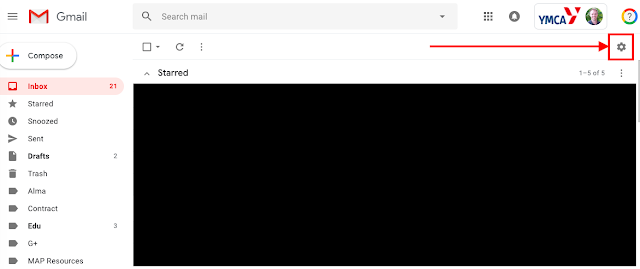
1. Click on the settings in the inbox (the gear icon)
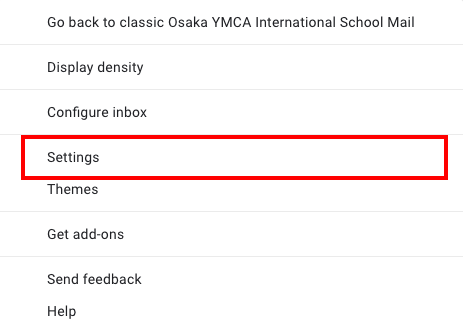
2. Click settings.
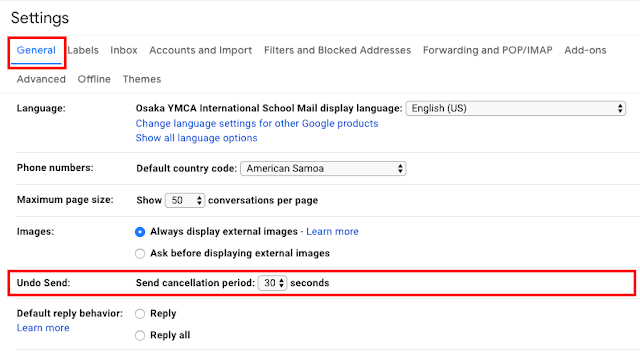
In the Settings menu under the General tab, Undo Send is the fifth option down. Select how long you want to have befor your emails are sent.
Enabling the undo send function in Gmail will let you undo a sent email for up to 30 seconds.
To enable undo send:
1. Click on the settings in the inbox (the gear icon)

2. Click settings.
In the Settings menu under the General tab, Undo Send is the fifth option down. Select how long you want to have befor your emails are sent.

Saturday, October 13, 2018
Convert PDFs Easily with PDF Candy
Ever have a document in PDF format but wanted it in some other form but there wasn't anything you could do?
Now you can!

Now you can!
PDF Candy is a website that allows you to convert PDFs to almost any other format. It also gives you the option to edit PDfs.
Saturday, September 29, 2018
Share Videos Safely With PureView
Have you ever wanted to share a YouTube video with your students? Have you ever hesitated because you were unsure of what would show up?
PureView is a website that will strip videos down to just a video that is free from distracting, and sometimes, inappropriate videos.


At the top, paste in the URL to the video you want to share.
You will then get a webpage with just the video on the ViewPure site.
From here, you can share this link to the purified video.

Alternatively, you can drag the applet into your bookmarks bar so you can quickly purify videos to share.
ViewPure has many more features, but this will get you started.
PureView is a website that will strip videos down to just a video that is free from distracting, and sometimes, inappropriate videos.


To Get Started
Go to the ViewPure website.At the top, paste in the URL to the video you want to share.
You will then get a webpage with just the video on the ViewPure site.
From here, you can share this link to the purified video.

Alternatively, you can drag the applet into your bookmarks bar so you can quickly purify videos to share.
ViewPure has many more features, but this will get you started.
Saturday, September 8, 2018
Add a Teacher in Seesaw
I was recently asked by a teacher to add her to my class. Although I am a SEESAW AMBASSADOR, I had never done this before.
I opened Seesaw and read the screen. The wrench in the upper-right side is where you can edit the settings.


I opened Seesaw and read the screen. The wrench in the upper-right side is where you can edit the settings.
When you click the wrench, it opens the Class Settings. The third option is to Manage Teachers.
After you click Manage Students, you are presented with an option to invite a teacher.
Friday, September 7, 2018
Office Editing for Docs, Sheets & Slides
 |
| Screenshot from the Chrome Store |
One teacher came to me the other day asking about a way to open a Word Doc on her computer Windows 10 computer that did not have Microsoft Office installed.
I thought the best solution was installing Open Office or LibreOffice, but it might be faster to install a Chrome Extension made by Google called Office Editing for Docs, Sheets & Slides.
I haven't installed this extension or used it yet, but it sounds like a good option.
I haven't installed this extension or used it yet, but it sounds like a good option.
Friday, April 20, 2018
What's This Useful Alternate Timezone in My Google Calendar?
Today I was putting something on my Google Calendar when I saw something I haven't noticed before. On the left side, next to the calendar in week view, were two time zones.

So I opened the calendar settings [hover the cursor next to the calendar name to reveal the three dots] and looked at my settings.
Here is what my settings looked like.

Right away I saw that there were two time zones (in the Time zone section). My first thought was to change the second one. But instead of having an option located inside the menu to not include it, that just allowed me to change it to a second time zone.


A little further down, Google has added a world clock function.

More really nice changes to Google Calendar.
This post first appeared on my blog, Mr Hammerlund.

So I opened the calendar settings [hover the cursor next to the calendar name to reveal the three dots] and looked at my settings.
Here is what my settings looked like.


Instead, Google has added a tick box at the top of the section.


More really nice changes to Google Calendar.
This post first appeared on my blog, Mr Hammerlund.
Sunday, April 8, 2018
Geoboard - The Awesome Chrome App

Geoboard was one of my favorite apps for the iPad, and I just found out it is also available as a Chrome App. (It is also in the Windows Store.) Geoboard is very slick, easy to use, and fun for students.
Geoboard is a virtual geoboard, so no more rubber band accidents or clean up. It is a great hands-on activity and is really good for inquiry-based learning and asking open-ended questions.
The help section (the i symbol in the bottom right) is awesome, containing lessons and links to other useful apps.

Note: This was originally posted on my blog.
Friday, March 30, 2018
Subscribe to:
Posts (Atom)
-
Photo by Thomas Hammerlund on Unsplash Below are three sites I use to search for images for my projects. When searching for an image, many ...
-
 This is a cheat sheet for Google Hangouts Meet I made while virtual learning. Go ahead and use this with attribution. And if you do use it, ...
