Showing posts with label Browser Extensions. Show all posts

Tuesday, March 30, 2021

Audiblogs for the Win

Audioblogs Logo

While watching YouTube, I clicked back to my homepage to see what video I would watch next and saw a video called The 10 Best Chrome Extensions for Productivity in 2021 by Thomas Frank. I have always liked finding new extensions that add better functionality to the browser I use [currently Brave]. One of the extensions on the list was Audiblogs. 

Audiblogs allows you to take a website or text on the web and convert it to a podcast.

When I saw this for general productivity I thought it was cool, but then I started to think about how this could impact students and was really impressed.


How to use it

1. Install the extension. Here is the link to the Chrome Web Store. 

2. Navigate to a web page you want to share. This can also be a Google Doc.

3. Click the extension as shown below. From here you can listen in the browser, or send to yourself as a podcast.


4. If you want to send as a podcast, click One-time Setup in Podcast App.

5. Choose the device type. (See below)


6. On the next page you will find a QR Code that you can use to get a link to your podcast.


7. On your phone, scan the QR Code and start listening to your article as a podcast.

After the initial setup - the next time you want to save an article as a podcast, simply click the extension.


===

Note: you may need to manually update or refresh your podcasts for the new ones to show up. In my testing, podcasts have taken a few minutes to show up in my feed. Until becoming comfortable with the app, try gathering the resources before class.

Note2: Some things, like PDFs, don't work. For these, I copied the text and put them into a Google Doc. Then, I had to publish the Doc to the web, then I could import the audio.

For this to work you will need a podcast app already installed on your phone. I think this could be a great way for reluctant readers or EAL learners to access the content. 

Saturday, March 27, 2021

Macbook Zipped File Issues on Windows: Files or directories outside directory

I developed a browser extension for Chrome. When you publish an extension, the Chrome Web Store askes you to "zip" your folder and upload it. 

Since I am a Mac user I right-clicked on the folder and "compressed" the folder. 

The file uploaded to Google's store with no problem.

Then I took the same extension and tried to publish it to the Edge Partner Store. (Is that the name?). It did not work. Instead, I got an error message that said Files or directories outside directory.


Files or directories outside directory


What did this mean? I had never seen this error before. I couldn't find a solution with a web search, so I went to Reddit and Stack Exchange looking for an answer. 

It was while I was writing out a description of the issue that I thought of a potential solution - the zipped file might have been the issue. It occurred to me that when I upload zip files to Dropbox there is sometimes an extra file I did not put there. It is a .ds file I believe. 

I found a Windows computer and zipped the file and uploaded it successfully. 

After this, I thought there had to be a better way. a quick search, I came across some Zipping options for the Mac. Instead of finding a Windows computer, and what I will do next time, is use Terminal and type in zip Archive.zip

If you are having issues with a Zipped file on a Mac, or if you want to password protect a file, try zipping through the Terminal. (The article I linked to shows how to add a password to the zip file.)

Browser Extensions: Make Your Icon Show Up

Ugh!

Coding can be awesome when things go right. Then other times, more often for me than not, things don't go as expected. 

It is extremely frustrating.

Look at the following screenshot. 


My icon is not showing up! 

Do you see how there are three icons that are greyed out? Here is how to fix that in the manifest.json file. 


The missing ingredient

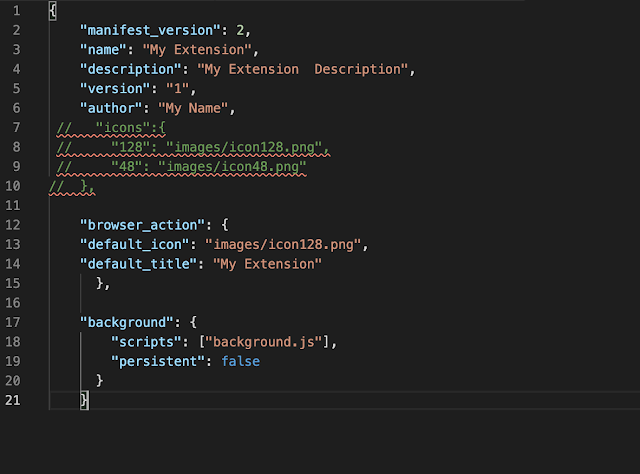
The missing part in the manifest.json file, the part that I struggled with for months -- because the extension functioned and I couldn't be bothered -- was the icons section.


When icons is removed, the icon on the extension page in the browser is missing.


So, if you are developing an icon, remember to add icons.